Kindle unboxing: The arrival of my new Kindle Paperwhite

Earlier in the week, I shared the sad tale of the demise of my beloved Kindle Oasis. After almost eight years of happy reading, during which I took excellent care of it, one little slip resulted in it cracking on my kitchen floor. Oh, the horror!

After a suitable period of mourning (roughly, two hours), I went ahead and ordered a replacement. Amazon no longer sells the Oasis, so after reading a bunch of reviews, I decided to go with the Kindle Paperwhite Signature Edition.

My new Kindle arrived this week — let’s take a look!

I went with a bundle option (more on purchase options later), and the various pieces arrived separately. Shown above — the box with the Kindle itself (left), plus the docking station (top right) and cover (bottom right).

You may be asking, why does a Kindle need such a big box?

Great question! It doesn’t. What a weird packing choice — it was just a mostly-empty box with the little Kindle box in it, no packing materials or anything else. Moving on…

I was happy to open up my boxes and start looking at the new Kindle! It’s very easy to get started — the new device was already registered to my account, so getting started consisted mainly of pressing the power button.

Once I turned it on, it just took a minute to sync with my wifi and load all my existing Kindle content.

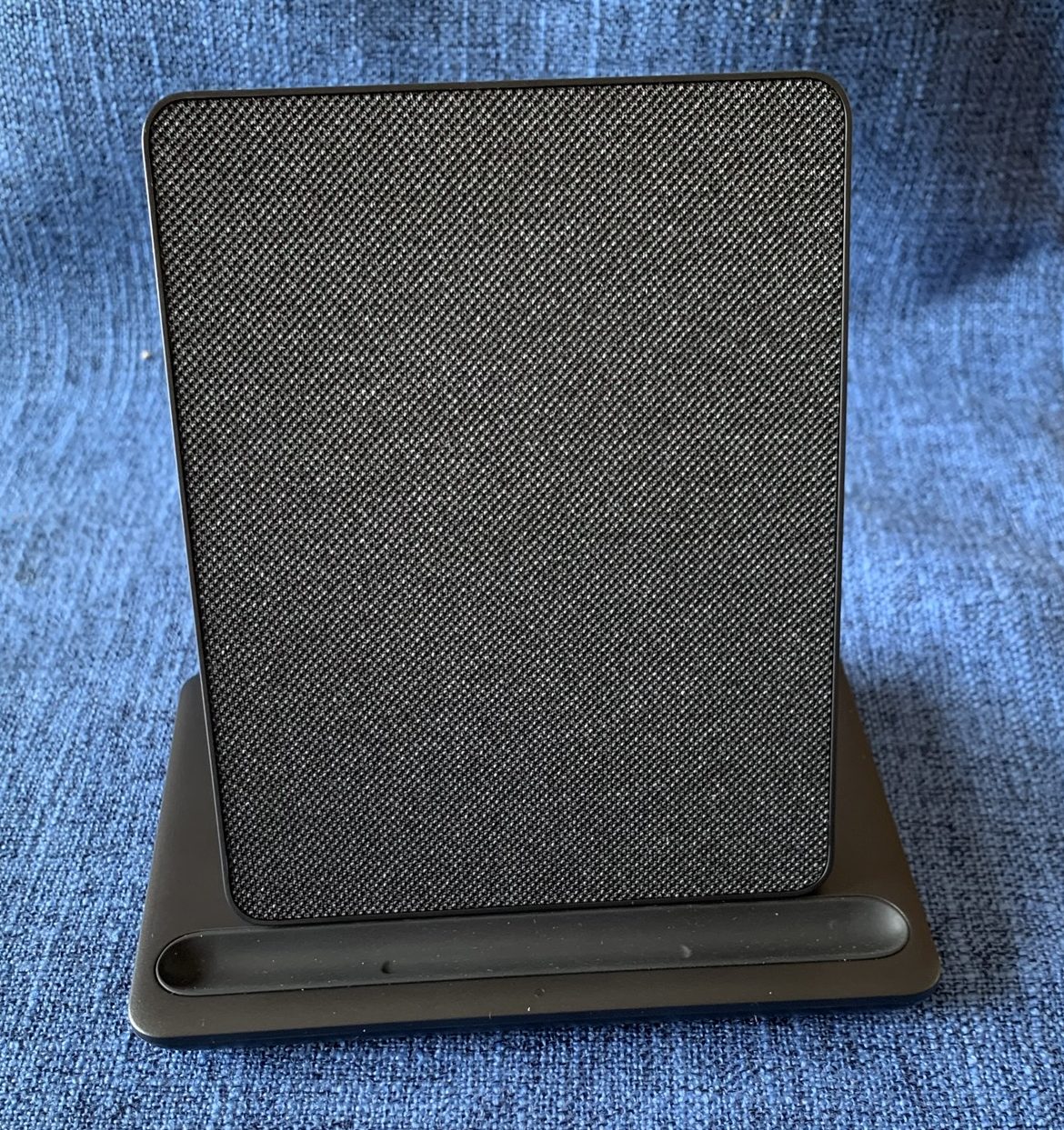
The other items in my bundle are the cover, which is pretty much just what I expected, and the the wireless charging dock, something not available with the Oasis. I think I’m going to like it!
My first step, after opening the box and turning on the new Kindle, was comparing the Paperwhite to the Oasis.

The Oasis (right) is square. There’s something about its sorta-clunky shape that I actually loved! It felt good in my hands, substantial but not heavy. The new Paperwhite (left) has different dimensions, and may take me a minute to adjust to.

And yet… the actual screen size is exactly the same! So the reading experience should be just about identical, with the same amount of text per page, depending on the settings I select.

(The main feature that Oasis-lovers seem to complain about is the lack of physical page turn buttons on the the Paperwhite. I didn’t use mine all that often on the Oasis, so it doesn’t feel like a loss for me, but I get that it could be hard to give up if that’s what you’re used to.)

So… first impressions?

I noticed that even with the same brightness levels selected, the Paperwhite has a more muted tone than the Oasis. Perhaps that’s because it has warmth settings that the Oasis doesn’t have, giving the option for an amber-toned reading environment. I have warmth set at zero for now, but I’m still noticing a slightly different look from the Oasis.

It’s really not a big deal, though, and I think I’ll get used to it. Other than that, the Paperwhite is easy to use, has the same reading options and interfaces as the Oasis, and seems like a perfectly fine choice for my needs! I did notice certain features in the settings that the Oasis doesn’t have, such as Vocabulary Builder and others — not sure that I’ll use any of these, but we’ll see once I settle in a bit more.

Really, the only hiccups so far have to do with the cover. I ordered a black cover for my new Kindle, and didn’t consider the fact that my husband has the same cover on his! To avoid confusion, I’m going to send mine back and get a different color.

The other hiccup relates to missing a feature of my Oasis cover. I’ve loved having this “origami” style of cover for my old Kindle, which is incredibly useful for hands-free reading. Sadly, Amazon does not sell a standing/origami cover for my new model — and while I see a bunch of varieties sold by other manufacturers, reviews about quality and fit are mixed, at best. I’ll have to find another solution for propping up my Paperwhite!

Apart from the minor cover-related hiccups…

I’m happy with my new Kindle and its assorted accessories, and look forward to a long, happy reading life together!
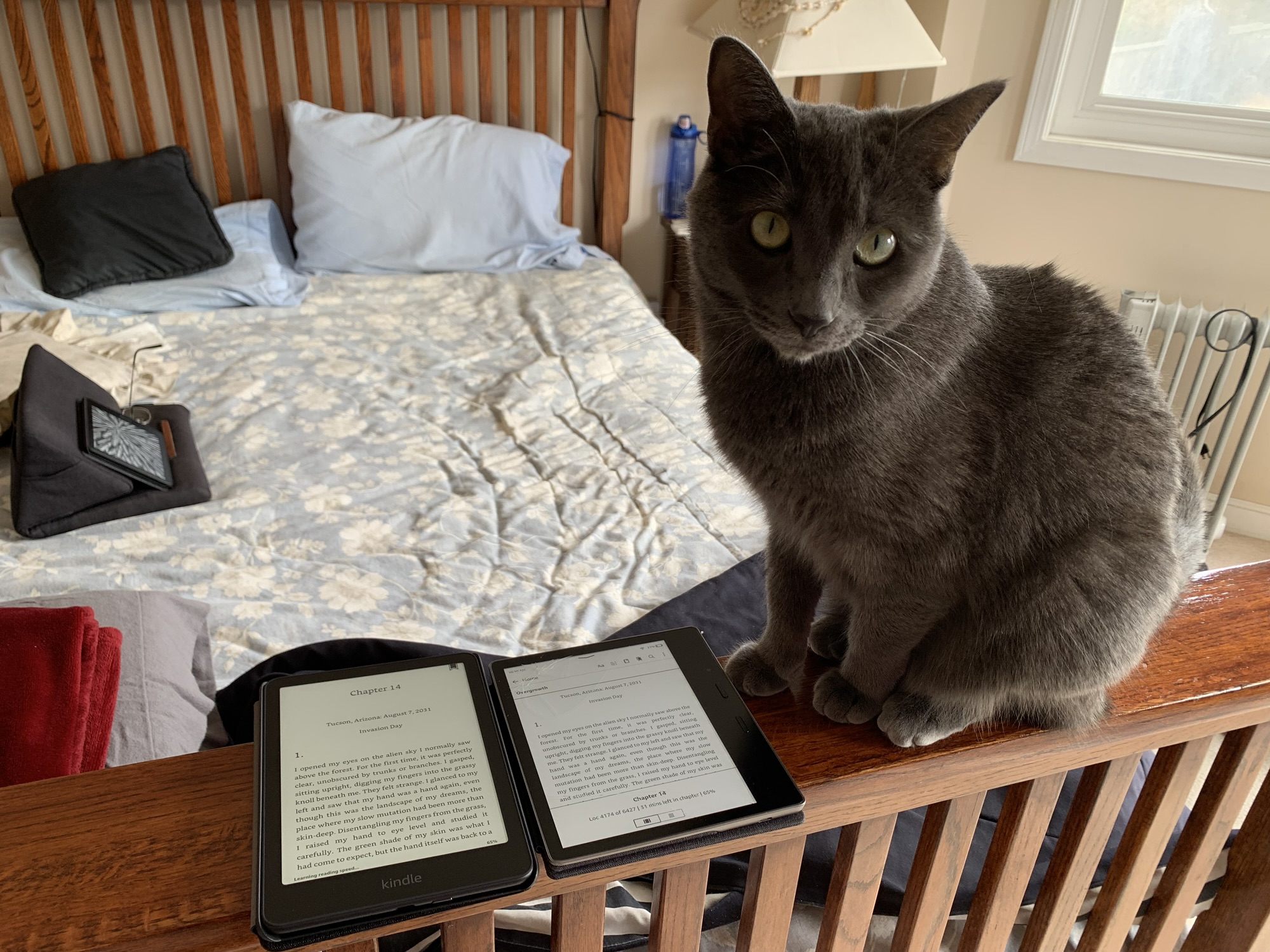
And the kitty approves! Or is indifferent… who knows?

Details: Here’s the run-down on what I bought:

First, it’s good to note that Amazon has a trade-in program for devices. Read about it here. By trading in a previous device, you get a gift card and a discount on your new device purchase. My trade-in gift card was a whopping $5, but the valuable piece is the discount: 20% off the new Kindle, which made the idea of replacing my poor damaged Oasis a lot easier to accept.

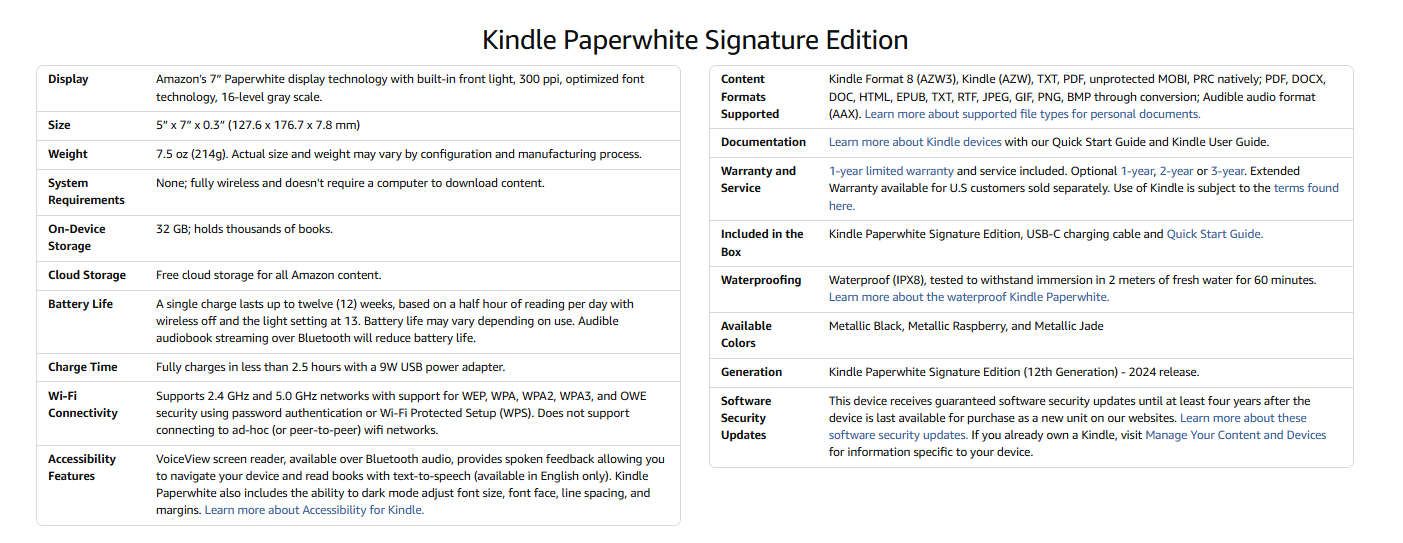
I purchased the Kindle Paperwhite Signature Edition in metallic black. This Kindle features auto-adjusting front lighting, 32 GB storage, USB-C charging, and is waterproof (although I wouldn’t want to put that to the test!).

Dimensions and specs (click images to enlarge):

Amazon offers bundled pricing, which saves a bit vs buying the accessories separately. I opted for the bundle which includes a fabric cover and the wireless docking station. Other bundles (at a higher price) include leather covers in a few color options, but I’m perfectly happy with fabric.

Available add-ons include screen protectors and a protection plan. I didn’t opt for either — but I’m considering the protection plan. There’s a 30-day window to add this. For $25, it provides two years of replacement coverage. That wouldn’t have helped me with my Oasis… but in case I get stupidly clumsy again with my new device, it might be nice to have.

Tragedy strikes! Death of a Kindle…

Dearly beloved,

We are gathered here today to mark the passing of a true friend, a source of companionship and countless happy memories, a constant presence who has enriched my life on a daily basis during all of our many years together.

Please join me in mourning the passing… of my Kindle Oasis.

I bought my Oasis in November of 2017, and it’s been wonderful. I loved the display quality, the size, the weight, the ease of use. A nice uncluttered look, easy to hold, highly portable.

Alas, it’s now being laid to rest.

It’s really all my fault. I was trying to continue reading while carrying other things from room to room, and it slipped and fell on the tile floor of my kitchen — with the cover open. I’m usually so careful! The poor Kindle landed face down, and I heard the crack as soon as it happened.

And here’s the result:

No one, apparently, fixes Kindle screens, and Amazon doesn’t offer repairs. The only choice is to live with it, which isn’t a long-term solution (it’s not only got cracks all across the reading surface, but it’s a little splintery too), or replace it.

Guess which I’m opting for?

Sadly, Amazon no longer sells the Kindle Oasis. Sigh. So I’m ordering myself a new Paperwhite, and it’ll be here later this week.

On the plus side, they do have a trade-in program. I get a whopping $5 gift card for sending back my Oasis, but the more valuable feature is a 20% discount on the new device. Between that, a gift card that I’ve been holding on to, and my credit card points, my total purchase price for a the Paperwhite Signature bundle (which includes a fabric case and wireless charging dock) comes to under $100. So I don’t feel too terrible about that.

My new Kindle will arrive by the weekend, and it will be time to send off my Oasis.

Cheers to you, my beloved Oasis! We’ve really had a good run.

Bookish musings: Life after death for a Kindle library?

What happens to my Kindle books when I die?

Not (I hope) that that’s imminent or anything… but my family was discussing giving away books, and one thing led to another, and this is the question that bubbled to the surface.

It all started with hearing about an acquaintance who was moving to a smaller home, and decided to give away all her non-essential books by inviting friends over for a book giveaway. She’d already sequestered her must-keep books, so she basically had a party where her shelves were open for plunder, and ended up loving seeing her friends from all different parts of her life come together over a love of books. Nice.

Of course, my husband then straight up suggested that I do the same thing! Um, no. Because (a) we’re not moving and (b) I don’t need the space my books take up for something else and (c) THEY’RE MY BOOKS AND I LOVE THEM AND I’M NOT GETTING RID OF THEM. Period.

But then we got to talking about the (hopefully) long-distant future… and I’m clear on my wishes. When I die, my lovely daughter, my partner in crime (ya know, if reading obsessively counts as a crime — which, no, it doesn’t) gets first pick on all books in the house, and once she’s done, she should first invite over a set of my book-loving friends to choose what they want, then donate the rest to the public library.

See? All nice and tidy.

Then I starting thinking about my Kindle. I currently have 817 books in my Kindle library. (Ssh, don’t ask me how many I’ve actually read.) All 817 represents some cost, because most were not free, even if I do tend to buy my e-books when there are price drops.

But do I really own the books on my Kindle? Sadly, the answer is no.

According to the Kindle terms of service on the Amazon website:

Use of Kindle Content. Upon your download or access of Kindle Content and payment of any applicable fees (including applicable taxes), the Content Provider grants you a non-exclusive right to view, use, and display such Kindle Content an unlimited number of times (for Subscription Content, only as long as you remain an active member of the underlying membership or subscription program), solely through a Kindle Application or as otherwise permitted as part of the Service, solely on the number of Supported Devices specified in the Kindle Store, and solely for your personal, non-commercial use. Kindle Content is licensed, not sold, to you by the Content Provider.

The red highlighting is my addition, but the point is, when we “buy” an e-book, we’re actually just paying for the right to view the content, but the content doesn’t become our property in the way that a physical paperback does. We can’t give it away when we’re done reading it or if we end up not liking it. We can lend a title, but with limits — not all titles are lendable, and the ones that are can only be loaned for a certain length of time, and only one time. (See this article for more on lending Kindle books).

Which brings me back to my question about what happens to my e-book collection after I die? Can I bequeath my e-books to a loved one?

I’m guessing not. Based on skimming through a bunch of random articles (thanks, interwebs!), as far as I can tell, the only thing I actually own is my Kindle device. If I don’t own the content (which, again, we apparently pay for the right to use, but don’t get the right to say it belongs to us), then it’s not mine to pass along to the next generation. Which doesn’t really feel great to me, considering that each and every e-book on my reader represents a sunk cost that, at the time, I considered a purchase — just like the money I spend on all the paperbacks and hardcovers scattered around my house.

The work-around, I suppose, is all about the physical device. Theoretically, anything downloaded to my Kindle should stay there indefinitely (especially if the wifi is turned off). If I hand someone my fully-loaded Kindle as a gift, then they can read all my stuff as if they were me.

So, I guess that my loved ones who live on after I’m gone can enjoy my e-books on my devices… and just to be safe, I should probably leave them all my account info (user ID and password) when I hand them my Kindle device from my deathbed (ooh, I’m getting morbid here). I may be gone, but my Amazon account can live on! But no, my e-books don’t become theirs, and if they lose my device and/or my account information, they’ll be out of luck.

How do you think about your e-books? Do you consider them yours? I’d be interested in hearing others’ thoughts on this… and let me know if I’ve gotten something wrong when it comes to “life after death” for my Kindle books!

For more on the topic of e-book ownership:
Do We Really Own Our Digital Possessions?
There is a Psychological Divide Over E-book Ownership

Resources for e-book price breaks

E-books can be awfully expensive, amiright?

So what’s a book-buying-obsessed reader to do? Well, for one thing, sign up for email alerts! There are loads of sites that feature e-book markdowns. Here are a bunch I rely on for stocking my Kindle on the cheap.

Kindle Daily Deal: Amazon’s daily featured price breaks. Sign up on your Amazon account’s subscription page.


Bookperk: From HarperCollins, a daily dose of reduced price e-books and special deals. Sign up for daily emails at http://www.bookperk.com/


Riffle: Also sends daily deals via email. Sign up at https://www.rifflebooks.com/users/sign_up


Early Bird Books: From Open Road Media, daily emails on price breaks, usually on books that have been out a few years. Info here: https://earlybirdbooks.com/


The Portalist: A sci-fi focused site also from Open Road Media, which has email alerts of sci-fi/fantasy price breaks as well. Info here: https://theportalist.com/


Kindle Price Break forum via Amazon: In Amazon Customer Discussions, a forum dedicated to price breaks. You can subscribe to the discussion to get an alert every time someone posts, and you can share your finds as well. Be warned — this group only allows posts with price breaks, and if you go off-topic in your posts, you will be shamed for it! There are some regular contributors who come up with an amazing assortment of books being marked down. Check it out and subscribe here.


eReaderIQ: This is a one-stop shop for price breaks, where you can search for deals and subscribe to email alerts. The site is here. The coolest thing about EreaderIQ is that you can set up your price break wishlist, where you can add the books you want to follow and specify when you want to be notified about a price break (for example, if the price drops by a certain increment or if it falls below a certain amount.)


Goodreads deals: You can sign up (here) to receive daily emails about deals tailored to you — so if a book on your to-read list has a price drop, you’ll see it here — as well as other deals related to your book recommendations. You can also explore deals on the Goodreads site by clicking Browse, then Deals. More info here.


Also worth noting is Amazon’s Kindle Matchbook program, which lets you buy Kindle versions of physical books you’ve already purchased from Amazon, for $2.99 or less. Not every single book is available, but for people like me who like to be able to access ALL their books, all the time, it’s a pretty cool option to check out. Start here, and then click Find Your Kindle Matchbook Titles to see your eligible books.


My local library branch. I love it so.

Of course, the cheapest way to read e-books is by borrowing them from your friendly local library! I adore my library, and I’m always checking out their newest e-book offerings. The only downside is the 3-week limit on borrowing with no renewal option, so if I get distracted mid-read and run out of time, I’m also out of luck. My library has Overdrive and Hoopla available, as well as some other e-reader options, and I love being able to put in my requests and download to my devices whenever my hold requests come in.

What other resources do you use for tracking e-book price breaks? Please share in the comments, and I’ll update this list with any new finds! (Plus, you’ll have my eternal gratitude… priceless!)

ARCs. Argh.

I think I’m giving up on ARCs.

More specifically, I’ve just had it up to here with badly formatted e-ARCs.

In theory, digital review copies should make my life as a reader, reviewer, and blogger easier, but lately, I’m finding them nothing but frustrating.

tux-161439_1280My most recent DNF was an e-ARC, and while the story itself didn’t particularly grab me, there were substantial formatting issues that certainly didn’t help. This historical novel included a map at the beginning showing key story locations and landmarks. Unfortunately, whether I tried using my Kindle, IPad, or phone app, the map appeared in three separate sections and was impossible to read. Funny, but if there had been no map, I wouldn’t have missed it. But knowing that I should be able to see it, but having it be unreadable, just ticked me off.

Beyond that, it was the usual litany of digital ARC woes:

No paragraph breaks. Dialogue without line breaks. No chapter breaks built into the document — so flipping back to the beginning of a chapter to check a date or a title is impossible.

Problems like these just make the reading experience so unenjoyable. I’ve read digital ARCS where the sections breaks were missing, so from one paragraph to another, a whole week has gone by in the narrative. I’m sure that would be clearer in the printed version, but until I figured this out, I just thought it was a badly written book!

And that’s really the crux of the matter: When the formatting gets in the way of being able to follow the story, or is so clunky that I have to stop and think about whose line of dialogue I just read, then my brain is focused on the wrong thing. How can I concentrate on the narrative and enjoy it if I’m constantly having to figure out the book’s layout issues?

girl-160172_1280If I had one suggestion to make to publishers, it would be to provide Kindle-ready ARCs rather than PDF versions.

I hate to say it, but even knowing that the finished product will not have all the format flaws, they’re really hard to ignore. I know better than to criticize the formatting in my reviews, but at the same time, I do believe I feel less favorably toward books when I have to struggle with bad formatting to get through them. If I don’t enjoy the reading experience, how can I enjoy the book itself?

At this point, I think I’ve reached some sort of moment of truth when it comes to digital ARCs. Right now, I have a backload of eARCs from NetGalley, and I want to honor my commitments and work my way through them… slowly. But going forward, I’ve more or less decided to cut back on (or eliminate altogether) any new NetGalley requests.

Let’s face it. I have plenty of books to read without getting digital review copies. Plenty. Piles. Boatloads. And if I don’t read the newest new releases the second they come out, I’ll survive. Hey, that’s what libraries are for.

Meanwhile, I’m happy to read physical ARCs (hint, hint, in case anyone who cares is reading this!) — but mostly, I’ll stick to the books on my shelf, the books I borrow from the library or my kind bookish friends, and the perfectly formatted books on my Kindle.

After all…

Life’s too short to read badly formatted books.

How about you? Does bad formatting get in the way of your enjoyment of ARCs? Or do you consider it a reasonable trade-off for access to early copies of upcoming releases?

Please share your thoughts!